Creating custom engines
The Engines are used to propagate the equations of motion or alter the state of the system in some other way. In this section, we describe how additional engines can be added to PyRETIS. Here, we make a distinction between two types of engines:
- Internal engines which directly interact with the underlying numpy.arrays representing positions, velocities and forces (see Fig. 13-left)
- External engines which are used by PyRETIS
to control the execution of external programs. In this case, the state of the
particles is represented by a file containing the positions and velocities.
As shown in the illustration below (Fig. 13-right) , this can be accessed using
ParticlesExt.configwhich is a tuple containing a file name and an index. The interpretation is that the current state of the system can be found in the given file at the given frame/index. Further, the attributeParticlesExt.vel_revis used to determine if the velocities in the configuration should be reversed or not. In this case the engine will typically make use ofParticlesExt.set_pos()in order to update the state of the system.
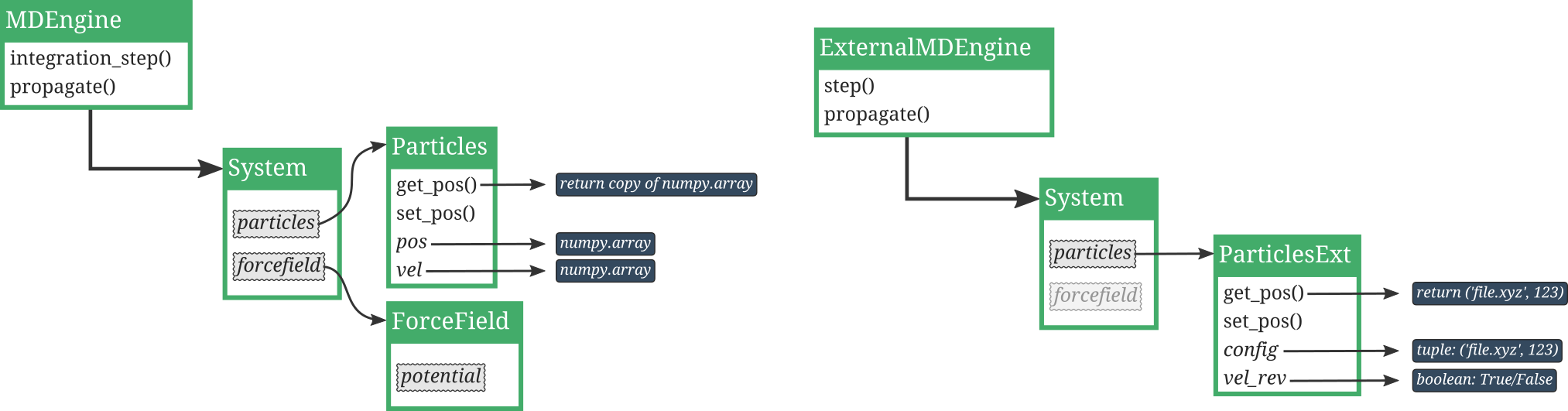
Fig. 13 Illustration of how internal engines (left) and external engines (right)
interact with the system and particles.
(Left) The internal engine interacts with and alters
the state of the system, and it can directly access the positions
and velocities, as numpy.arrays, using Particles.pos and
Particles.vel.
(Right) The external engine interacts with and alters
the state of the system using ParticlesExt.set_pos() and
the state of the system is represented by the attribute
ParticlesExt.config.
Table of contents
Creating a new internal engine
In order to create a new internal engine, we create a new class
for our engine which is sub-classing the generic EngineBase.
Often, we wish to create a new integrator for molecular dynamics
and then we can simplify our work by sub-classing the more specific
MDEngine. The steps you need to complete in order to
create a new MDengine is as follows:
- Create a new Python class which is a sub-class of
MDEngine - Write a method to initialise this class, that is a
__init__method. This method will be called when PyRETIS is setting up a new simulation and it will be fed variables from the PyRETIS input file. - Write a method to perform a single integration step.
- Modify the input script to use the new integrator.
Example: Creating a new internal LeapFrog integrator
To be specific, we will in the following show the steps needed to create a new MD engine using the Leapfrog scheme [1]:
where \(\mathbf{r}\) are the positions, \(\mathbf{v}\) the velocities, \(\mathbf{a}\) the accelerations, \(\Delta t\) the time step and \(t\) is the current time.
Step 1 and 2: Sub-classing MDEngine
In order to define a new class to use with PyRETIS we
sub-class the MDEngine and define the
__init__ method:
class LeapFrog(MDEngine):
    """Perform Leap Frog integration."""

    def __init__(self, timestep):
        """Initiate the engine.

        Parameters
        ----------
        timestep : float
            Set the time step for the integrator.
        """
        super().__init__(timestep, 'Leap Frog integrator', dynamics='NVE')
        self.half_timestep = self.timestep * 0.5
        self.half_timestep_sq = 0.5 * self.timestep**2
Step 3: Adding the integration step method
Now, we add the actual integration routine:
    def integration_step(self, system):
        """Perform one step for the Leap Frog integrator."""
        particles = system.particles
        imass = particles.imass

        # get current acceleration:
        acc_t = particles.force * imass
        # update positions:
        particles.pos += (self.timestep * particles.vel +
                          self.half_timestep_sq * acc_t)
        # update forces:
        system.potential_and_force()
        # update acceleration:
        acc_t2 = particles.force * imass
        # update velocities:
        particles.vel += self.half_timestep * (acc_t + acc_t2)
Step 4: Making use of the new integrator
The new integrator can be used by specifying the following engine section:
Engine
------
class = LeapFrog
module = leapfrog.py
timestep = 0.002
where the keyword module specifies the file where you have
stored the new LeapFrog class.
Creating a new external engine
The external engines are used to interface external programs.
In PyRETIS there is a generic ExternalMDEngine which
you can make use of in order to set up new custom external engines.
Before we give an overview of the methods you will have to implement
in order to create a new engine, we list some useful methods which
are already present in the generic ExternalMDEngine:
ExternalMDEngine.execute_command()which can be used to execute system commands.- Methods to interact with files:
ExternalMDEngine._modify_input()which can be used to modify simple input files for the external software.
In order to create a new external engine, there are several methods that you need to implement. These methods are described in the next section. Before reading this description, please have a look at the figure below which illustrates the interaction between PyRETIS and the external engine:
Implementing methods for a new external engine
The following methods must be implemented in the new engine:
- __init__ which does some set-up for the external engine.
- step which is a method for performing a single MD step with the external engine.
- _read_configuration For reading output (configurations) from the external engine. This is used for calculating the order parameter(s).
- _reverse_velocities For reversing velocities in a snapshot. This method will typically make use of the _read_configuration.
- _extract_frame For extracting a single frame from a trajectory.
- _propagate_from The method for propagating the equations of motion using the external engine.
- modify_velocities The method used for generating random velocities for shooting points.
Some examples/templates are shown in the following sections.
The __init__ method
The __init__ method sets up the engine and makes it ready for use.
This can, for instance, involve checking that the required input files are
in place and checking the consistency of the input files.
import os
from pyretis.engines.external import ExternalMDEngine


logger = logging.getLogger(__name__)  # pylint: disable=invalid-name
logger.addHandler(logging.NullHandler())

INPUT_CONF = []
OUTPUT_FILES = []
REQUIRED_FILES = []


def get_energy():
    """Fictional function to read energy."""
    return 42, 42


def kinetic_energy_output_from_velocity_generation(_, __):
    """Fictional function to read kin eng."""
    return 42


def method_to_read_config_file(_):
    """Fictional function to read config file."""
    return 42, 42


def method_to_write_config_file(_, __, ___):
    """Fictional function to write a config file."""
    return


class NewEngine(ExternalMDEngine):
    """A new external engine class.

    Attributes
    ----------
    exe : string
        The command for executing the engine.
    input_path : string
        The directory where the input files are stored.
    timestep : float
        The time step used in the external MD simulation.
    subcycles : integer
        The number of steps each external step is composed of.
    """

    def __init__(self, exe, input_path, timestep, subcycles):
        """Initiate the script.

        Parameters
        ----------
        exe : string
            The engine executable.
        input_path : string
            The absolute path to where the input files are stored.
        timestep : float
            The time step used in the external engine.
        subcycles : integer
In addition, this is a good point to add a method to execute
the external program. Here we will make use of
ExternalMDEngine.execute_command() and the
ExternalMDEngine.exe_dir property. This property
is set internally by PyRETIS and points to a directory which
we will use when executing the external engine. As a concrete
example, if we are generating a path for ensemble \([1^+]\),
this will point to the sub-directory generate of the
ensemble-directory 002.
Here is a short template for executing external commands:
    def _run_program(self):
        """Method to execute the new engine.

        Returns
        -------
        out : dict
            The files created by the run.
        """
        self.execute_command(self.exe, cwd=self.exe_dir, inputs=None)
        out = {}
        for key in OUTPUT_FILES:
            filename = os.path.join(self.exe_dir, key)
            if os.path.isfile(filename):
                out[key] = filename
        return out
The step method
The step method is used to execute a single step with the external software. This method is used by the PyRETIS engine in the following way:
conf = self.step(system, 'output-file')
That is, the method takes in two parameters: a system object and a string
and returns a single parameter. This single parameter is just a string
which contains the output configuration created after executing the
external program. Here is a short template for the step method:
    def step(self, system, name):
        """Perform a single step with the external engine.

        Parameters
        ----------
        system : object like :py:class:`.System`
            The system we are integrating.
        name : string
            To name the output files from the step.

        Returns
        -------
        out_files : dict
            The output files created by this step.
        """
        # Get initial config:
        input_file = self.dump_frame(system)
        # copy input files, maybe rename input_file etc.
        # Then, run it
        out_files = self._run_program()
        # Store the frame after the step, make use of the name variable:
        config = os.path.join(self.exe_dir, 'OUTPUT.{}'.format(name))
        # Get energies
        ekin, vpot = get_energy()
        # remove files that we dont need after the step:
        files_to_remove = []
        self._remove_files(self.exe_dir, files_to_remove)
        # Update the state of the system to match the current config
        phase_point = {'pos': (config, None),
                       'vel': False, 'vpot': vpot, 'ekin': ekin}
        system.particles.set_particle_state(phase_point)
        return config
The _read_configuration method
The _read_configuration method is used to get the actual
positions and velocities from a configuration file. As
a short template:
    @staticmethod
    def _read_configuration(filename):
        """Method to read config files for the external engine.

        This method is used when we calculate the order parameter.

        Parameters
        ----------
        filename : string
            The file to read the configuration from.

        Returns
        -------
        xyz : numpy.array
            The positions.
        vel : numpy.array
            The velocities.
        """
        xyz, vel = method_to_read_config_file(filename)
        return xyz, vel
The _reverse_velocities method
The _reverse_velocities method is used to reverse velocities for
a single configuration.
    @staticmethod
    def _reverse_velocities(filename, outfile):
        """Method to reverse velocity in a given snapshot.

        Parameters
        ----------
        filename : string
            The configuration to reverse velocities in.
        outfile : string
            The output file for storing the configuration with
            reversed velocities.
        """
        xyz, vel = method_to_read_config_file(filename)
        method_to_write_config_file(outfile, xyz, -vel)
The _extract_frame method
The _extract_frame method is used to extract a single snapshot from
a trajectory file.
    def _extract_frame(self, traj_file, idx, out_file):
        """Extract a frame from a trajectory file.

        This method is used by `self.dump_config` when we are
        dumping from a trajectory file. It is not used if we are
        dumping from a single config file. Here you can write
        your own code for dumping or make use of existing libraries
        such as mdtraj, mdanalysis, ase, ...

        Parameters
        ----------
        traj_file : string
            The trajectory file to dump from.
        idx : integer
            The frame number we look for.
        out_file : string
            The file to dump to.
        """
        return
The _propagate_from method
The _propagate_from method is used to propagate the equations of motion
using the external engine. In some cases, this can make use of the
step method, in other cases this is
really distinct (e.g. in GROMACS this would correspond to extending a
simulation).
    def _propagate_from(self, name, path, ensemble, reverse=False):
        """Propagate from the current system configuration.

        Here, we assume that this method is called after the propagate()
        has been called in the parent. The parent is then responsible
        for reversing the velocities and also for setting the initial
        state of the system.

        Parameters
        ----------
        name : string
            A name to use for the trajectory we are generating.
        path : object like :py:class:`.PathBase`
            This is the path we use to fill in phase-space points.
            We are here not returning a new path - this since we want
            to delegate the creation of the path to the method
            that is running `propagate`.
        ensemble: dict
            it contains:
            * `system` : object like :py:class:`.System`
              The system object gives the initial state for the
              integration. The initial state is stored and the system is
              reset to the initial state when the integration is done.
            * `order_function` : object like :py:class:`.OrderParameter`
              The object used for calculating the order parameter.
            * `interfaces` : list of floats
              These interfaces define the stopping criterion.
        reverse : boolean
            If True, the system will be propagated backwards in time.

        Returns
        -------
        success : boolean
            This is True if we generated an acceptable path.
        status : string
            A text description of the current status of the propagation.
        """
        # Dumping of the initial config were done by the parent, here
        # we will just the dumped file:
        initial_conf = ensemble['system'].particles.get_pos()[0]
        # Copy this file, in case the external program requires
        # specific names for the input configurations:
        input_conf = os.path.join(self.exe_dir, 'input_conf')
        output_conf = os.path.join(self.exe_dir, 'output_conf')
        self._copyfile(initial_conf, output_conf)
        # Set the positions to be just the file we copied:
        ensemble['system'].particles.set_pos((input_conf, None))
        # Create the output trajectory file:
        traj_file = os.path.join(self.exe_dir, name)
        # Add other files here as well, input settings, force field etc...
        success = False
        left, _, right = ensemble['interfaces']
        phase_point = ensemble['system'].particles.get_particle_state()
        # Just to be keep the same order as in the loop
        vpot = phase_point['vpot']
        ekin = phase_point['ekin']
        order = self.calculate_order(ensemble)
        for i in range(path.maxlen):
            # We first add the current phase point, and then we propagate.
            phase_point = {
                'order': order,
                'pos': (traj_file, i),
                'vel': reverse,
                'vpot': vpot,
                'ekin': ekin}
            status, success, stop = self.add_to_path(path, phase_point,
                                                     left, right)
            # Add the current frame to the output trajectory also:
            # e.g.: add_frame_to_traj('CURRENT_FRAME_FILE', traj_file, i)
            if stop:
                logger.debug('Ending propagate at %i. Reason: %s', i, status)
                break
            # Here execute the external program
            # for instance by using self.step() or self._run_program()
            # get energies after execution:
            ekin, vpot = get_energy()
            # Recalculate order parameter
            # If the output file is named different, update the
            # system object so that it points to this file, e.g.:
            # system.particles.set_pos((NAME_OF_FILE, None)), or
            # if the energies are needed as well, use
            # system.particles.set_particle_state(...)
            order = self.calculate_order(ensemble)
        # We are done with the execution:
        # clean up and remove files:
        list_of_files_to_remove = []
        self._remove_files(self.exe_dir, list_of_files_to_remove)
        return success, status
The modify_velocities method
This method is used to draw random velocities, typically when
performing the shooting move. The generic modify_velocities method
is quite involved, but for most cases is sufficient to only implement
aimless shooting. Here is a template:
    def modify_velocities(self, system, rgen, vel_settings):
        """Modify the velocities of the current state.

        This method will modify the velocities of a time slice.

        Parameters
        ----------
        system : object like :py:class:`.System`
            System is used here since we need access to the particle
            list.
        rgen : object like :py:class:`.RandomGenerator`
            This is the random generator that will be used.
        vel_settings: dict
            It contains all the info for the velocity:

            * `sigma_v` : numpy.array, optional
              These values can be used to set a standard deviation (one
              for each particle) for the generated velocities.
            * `aimless` : boolean, optional
              Determines if we should do aimless shooting or not.
            * `momentum` : boolean, optional
              If True, we reset the linear momentum to zero after
              generating.
            * `rescale` : float, optional
              In some NVE simulations, we may wish to re-scale the
              energy to a fixed value. If `rescale` is a float > 0,
              we will re-scale the energy (after modification of
              the velocities) to match the given float.

        Returns
        -------
        dek : float
            The change in the kinetic energy.
        kin_new : float
            The new kinetic energy.
        """
        dek = None
        kin_old = None
        kin_new = None
        rescale = vel_settings.get('rescale')

        if rescale is not None and rescale is not False and rescale > 0:
            # Code to support energy rescale, or just ignore this as
            # set:
            msgtxt = 'External engine does not support energy rescale!'
            logger.error(msgtxt)
            raise NotImplementedError(msgtxt)
        else:
            kin_old = system.particles.ekin
        if vel_settings.get('aimless', False):
            # pos = self.dump_frame(system)
            phase_point = system.particles.get_particle_state()
            # Generate new velocities, either by hand or by asking the
            # external program.
            genvel = os.path.join(self.exe_dir, 'g_POSCAR')
            # Also get the new kinetic energy
            kin_new = kinetic_energy_output_from_velocity_generation(genvel,
                                                                     rgen)
            # Update the phase point (note we keep the potential energy):
            phase_point['pos'] = (genvel, None)
            phase_point['vel'] = False
            phase_point['ekin'] = kin_new
            system.particles.set_particle_state(phase_point)
        else:  # soft velocity change, add from Gaussian dist
            # You might not need to support this:
            msgtxt = 'External engine only support aimless shooting!'
            logger.error(msgtxt)
            raise NotImplementedError(msgtxt)
        if kin_old is None or kin_new is None:
            dek = float('inf')
            logger.warning(('Kinetic energy not found for previous point.'
                            '\n(This happens when the initial configuration '
                            'does not contain energies.)'))
        else:
            dek = kin_new - kin_old
        return dek, kin_new